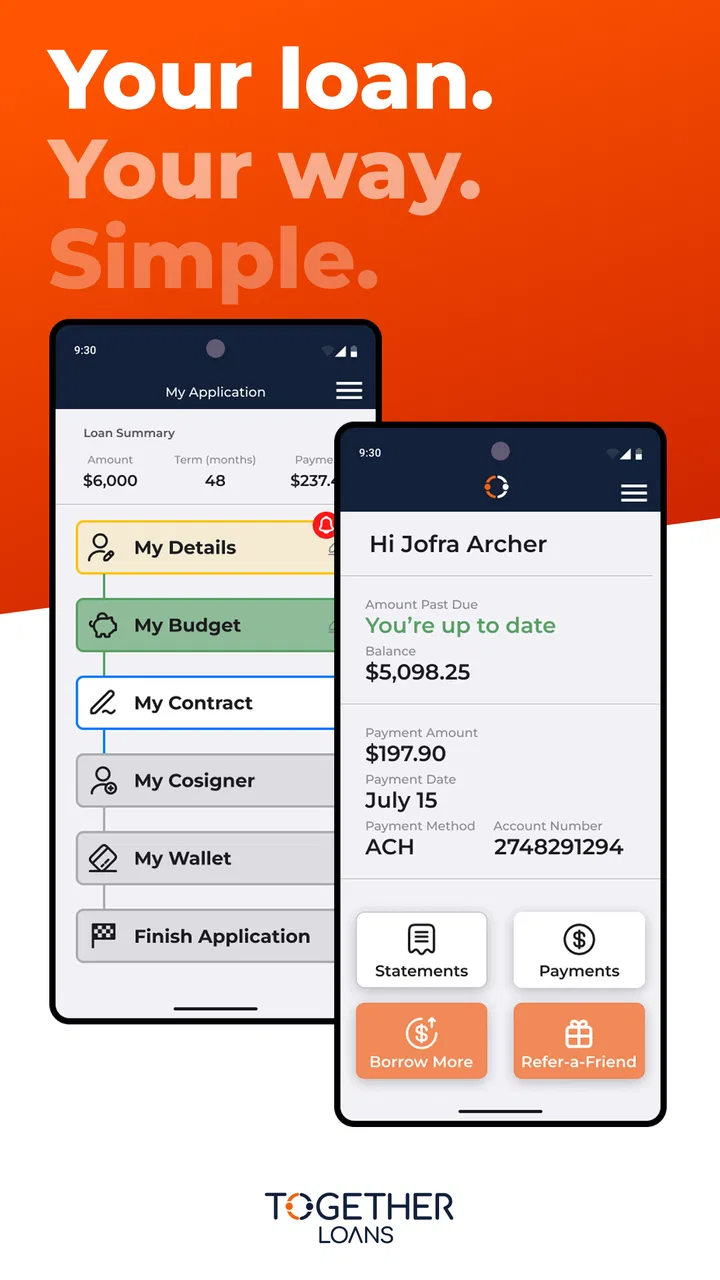
Together Loans
- 4.3
- Rating
- 100.00K
- Installs
- Free
- Price

 Analysis by App-foxy
Managing a loan from a phone sounds simple until you need to check something at an inconvenient moment: a payment detail while you are away from home, an account update between errands, or a quick look at what still needs attention. Together Loans is built for that narrow but useful purpose. Developed by Transform Credit Inc, it puts loan management into a mobile finance app rather than asking you to rely on a browser or scattered messages.
I found the appeal less about having a large collection of financial tools and more about having a focused place for loan-related tasks. That focus can be reassuring if you already use Together Loans and want a convenient companion for keeping track of the account. It is free to install, rated for Everyone, and available for devices running Android 7.0 or later. The current release is version 9.1.2, while the app itself first appeared on April 2, 2024.
My overall impression is that this is an app for borrowers who value access and routine management more than financial discovery. It is not the kind of finance app I would choose to replace a full budgeting system, compare lending products, or organize every part of my household money. Its job is narrower, and that can be a strength when the task is simply staying connected to a loan account.
You May Also Like

 Blood Strike: 2.5 Anniversary
Blood Strike’s Loadouts Turn Every Drop Into a Tactical Gamble
A close look at Blood Strike’s custom loadouts: how fast access to signature weapons reshapes its battle royale rhythm, rewards preparation, and narrows the gap between fights.

 Pandora - Music & Podcasts
Pandora’s Music Is Easy to Start, but Harder to Recover
Pandora’s strength is its low-effort path from a seed to a station. Its weak spot is how much confidence it asks you to place in connection, setup, and quiet recovery.

 8 Ball Pool
 Is Built on Rivalries, Rematches, and Routine
A close look at the rivalries, rematches, shared routines, and unanswered safety questions that turn a quick pool match into a persistent mobile community.

 Samsung Music
’s Quiet Strength Is Playing What You Already Own
Its reach comes less from spectacle than from dependable access to a personal library. That simplicity is both the app’s strongest retention engine and its ceiling.

 AccuWeather: Weather Radar
AccuWeather Review: A Quick, Clear Forecast for Everyday Decisions
For everyday plans, the best forecast is the one you can understand quickly. AccuWeather makes rain timing, radar, and local conditions easy to act on, with a few trade-offs.

 Hill Climb Racing
Why Hill Climb Racing Still Turns Crashes Into One More Run
A tiny car, a bumpy hill and one more upgrade: Hill Climb Racing keeps resurfacing because its simple chaos makes every near-miss feel personal.
More From Our News Desk



How the experience changes when the network matters
I find that network quality changes Together Loans from a quick account check into a task that may need patience. In this section, I look at why a stable connection matters for time-sensitive loan questions and how I decide whether to continue or wait. That leads into the different places and moments when mobile access can be genuinely useful.
Useful when a loan question cannot wait
The most important part of using Together Loans is the connection between the phone and the loan service. Whenever I wanted current account information, I treated the app as a live access point rather than a notebook containing a complete local record. That distinction matters. A finance app can feel reassuring because it is sitting on the phone, but loan information is only truly useful when the app can reach the service handling the account.
In a normal connected setting, the mobile format makes sense. I can imagine opening it before making a payment, checking an account detail after receiving a reminder, or confirming what I need to do while away from a computer. The benefit is not dramatic; it is practical. I do not have to wait until I am back at a desk to deal with a small but time-sensitive loan question.
That convenience depends on the quality of the network at the moment I need it. A strong home connection or reliable mobile data makes the experience feel direct. A weak signal, crowded public Wi-Fi network, or temporary service interruption changes the mood quickly, especially when the information concerns money. I would not use the app as my only memory of an upcoming obligation. I would keep important dates and confirmations in a separate place as well.
A realistic day-to-day example
Imagine I am leaving work and realize I need to review my loan before moving money between accounts. I may have only a few minutes while waiting for a bus. Together Loans is useful in that situation because the phone is already with me and the task is focused. I can open the app, connect, review the relevant account information, and decide what to do before I get home.
The same scenario also shows the limitation. If the bus stop has poor reception, I should not assume that the app can provide a dependable substitute for a connection. I would rather wait for a stable signal than make a rushed financial decision based on incomplete loading or an uncertain screen. For me, the app improves access, but it does not remove the need for sensible timing.
Why mobile access beats a browser for some borrowers
The usual alternative is to manage a loan through a website. A browser may still be preferable when I need a larger screen, want several tabs open, or am reviewing documents alongside bank records. However, a dedicated app is easier to reach during short moments. I do not have to remember which browser tab contains the account or start from a general website each time.
That advantage is strongest for a borrower who checks one loan regularly. It is less compelling for someone who rarely needs access and already has a comfortable desktop routine. Installing an app adds another item to the phone, so the convenience has to be real enough to justify that small commitment.
Using it in different mobile contexts
The same phone can feel convenient at home and less suitable in a crowded or rushed setting, so I weigh more than signal strength when choosing when to open a loan account. Here I consider how location, privacy, and the size of the task affect my routine. Those everyday contexts also make it easier to see what I would do if the connection drops mid-session.
At home, on the move, and between tasks
At home, I would use Together Loans when I want a quick account check without opening a laptop. The phone is usually close, and a stable private connection makes the process feel uncomplicated. In that environment, the app fits naturally into a short financial routine: check the account, review what needs attention, and close it.
On the move, the value becomes more noticeable. A borrower may need to look at loan information while shopping, traveling, or handling an unexpected expense. The app is suited to that kind of brief interaction because it keeps the loan service within reach. I would still avoid using it casually in a crowded place if the screen contains information I would rather keep private. Convenience should not lead me to ignore basic financial privacy.
During a busy day, the app can help reduce the friction around small checks. I do not need to turn loan management into a long session. That is particularly helpful for people who prefer to review financial matters in short intervals rather than dedicate a large block of time. The trade-off is that a phone screen is not ideal for deep comparison or careful document review.
Who benefits most from this format
I think Together Loans is most suitable for existing borrowers who want a straightforward mobile route to their loan account. It also makes sense for people who are frequently away from a computer and want to handle routine checks from a phone. The focused design implied by its purpose is more useful here than a crowded finance dashboard would be.
I would be more cautious about recommending it to someone looking for a complete money-management center. If I wanted spending categories, investment tracking, bill planning, or a broad view of several financial providers, I would choose a dedicated budgeting or banking app instead. Those tools are designed for wider financial organization, while Together Loans is centered on the loan relationship.
It may also be a poor fit for a person who dislikes depending on mobile connectivity for important account access. A website on a full computer can be easier to navigate for detailed work, and a paper or calendar reminder remains useful for obligations that should not depend on opening an app at all. The best setup may be a combination: use the app for access and a separate system for personal reminders.
What the audience figures suggest
The app has passed 100K installs and holds a 4.3 average from 614 ratings, with 272 written reviews. Those figures suggest that it has found a meaningful audience without making it a universal finance tool. I read that as a sign of practical usefulness for its intended group rather than proof that it will suit every borrower.
The Everyone age rating also makes the app approachable from a store perspective, but financial responsibility still depends on the person using it. An accessible interface does not replace reading loan information carefully, checking the destination of a payment, or keeping personal records. I would treat the age label as a statement about general app content, not as financial guidance.
What happens when a connection fails
A stalled screen is especially uncomfortable when I am checking financial information, because I do not want to mistake an incomplete view for a finished task. I explain the cautious recovery habits I use, including when I would stop retrying and switch to another access method. From there, it is worth considering how to keep mobile use focused without sacrificing care.
Handling slow loading without making a bad decision
Connectivity problems are more serious in a loan app than in an entertainment app. If a video pauses, I can try again later. If a financial screen loads slowly, I need to know whether I am seeing current information, an incomplete view, or no useful result at all. My practical rule is simple: if the app does not clearly finish loading, I stop and try again on a more reliable connection rather than guessing.
I also avoid repeatedly tapping actions when the network is uncertain. In any payment-related workflow, duplicate taps can create confusion about whether a request was accepted. I would wait for a clear response, check the account again when the connection is stable, and keep any confirmation information that appears. This is not a special feature of the app; it is a sensible habit for using a connected financial service.
Recovery after an interrupted session
If I lose reception while checking the account, I would first move to a more dependable connection and reopen the relevant screen rather than relying on what was visible before the interruption. A fresh check is more trustworthy than assuming the earlier display is still current. If the issue continues, I would use the account’s normal support route or another official access method instead of turning repeated retries into a guessing game.
This recovery approach is one reason I would not uninstall my browser or abandon other records after installing Together Loans. The app can be the most convenient route, but redundancy is sensible for financial tasks. Keeping a note of important account actions, dates, and confirmations gives me something to refer to if the phone, connection, or app session becomes inconvenient.
When the browser or another method is better
A browser is the better choice when I need to work with a larger amount of information or when the app is not cooperating with the current network. A desktop environment also gives me more room to compare the loan account with my budget and bank balance. Together Loans wins for quick access, but it does not automatically win for every kind of financial work.
I would also prefer a separate reminder system for deadlines. An app that helps me manage a loan is not the same thing as a calendar, and I do not want an important date to depend entirely on remembering to open it. A calendar alert, a written note, or a routine bank review can complement the app without replacing its account-access role.
Using mobile data thoughtfully
I treat mobile data as part of a deliberate loan-management routine: open the app with a clear purpose, review the result, and avoid unnecessary retries. This section also considers the setting and privacy of a session, not just the connection itself. Those habits help me use the phone efficiently while keeping important decisions grounded in a clear result.
Why connection habits matter
Loan management is usually a light, purposeful activity, but I still pay attention to where I use it. On a limited mobile plan, I would open the app only when I have a clear task, let the account information load, and close it when finished. I would avoid repeatedly refreshing a screen simply because I am uncertain whether the first attempt worked.
On Wi-Fi, I would favor a connection I trust, especially when handling personal financial information. Public networks may be convenient, but I prefer not to conduct sensitive account tasks while surrounded by strangers or using an unfamiliar connection. The app’s usefulness should be balanced with the privacy of the setting in which I open it.
A simple low-data workflow
My preferred routine is to decide what I need before opening Together Loans. If I am checking an account detail, I connect, review the information carefully, complete only the necessary action, and save any important confirmation in my own records. This reduces unnecessary screen changes and keeps the session focused.
That workflow is especially helpful on a phone because distractions are close by. I do not want to open a finance app without knowing why, then lose track of the original task. A short checklist works well: confirm the account, confirm the action, confirm the result. It is a small habit, but it reduces the chance of confusing an unfinished session with a completed one.
Privacy beyond the connection
Data-conscious use is not only about the amount of mobile data consumed. I also consider screen visibility, phone security, and what I leave in notifications or screenshots. I would avoid capturing loan details unnecessarily and would lock my phone when I finish. If another person regularly uses the device, I would be particularly careful about leaving the app open.
These habits matter because a mobile loan account travels with me. The portability that makes Together Loans convenient also means I can open it in places where privacy is harder to control. I see that as a reason to use the app deliberately, not a reason to avoid it altogether.
My connectivity verdict
Together Loans works best when I view it as a connected access tool for an existing loan, not as a complete financial command center. Its strongest quality is convenience: the loan account is available from a phone during the small gaps in a normal day. That makes it more practical than a browser for quick checks, while a browser or budgeting app remains better for broader financial work.
The connection requirement shapes the experience in both directions. Reliable access makes the app feel immediate, but a weak signal can turn a simple check into an uncertain one. I would use it on a stable connection when possible, avoid guessing after interrupted loading, and keep separate reminders and records for important obligations. Those habits make the mobile format safer and more dependable.
Transform Credit Inc has positioned the app around a clear need, and the result is easier to understand than a finance app that tries to do everything. The free price lowers the barrier to trying it, and the current 9.1.2 release gives borrowers a straightforward way to keep the loan relationship close at hand. Still, I would skip it if I wanted detailed budgeting, multi-account analysis, or a desktop-first workflow.
My recommendation is straightforward: if you already manage a Together loan and want a focused mobile companion for routine access, I think Together Loans is worth considering. Just remember that the phone is only the doorway; the quality of the experience depends on your connection, your privacy habits, and your willingness to verify important actions instead of treating a loading screen as confirmation.
FAQs for Together Loans
01What is Together Loans, and how does the app work?
Together Loans is a financial service platform designed to help users explore borrowing options and manage loan-related information from a mobile device. After providing requested personal and financial details, you may be shown available products or connected with potential lenders. The service may not directly approve or fund every loan, so read the terms carefully and confirm who the actual lender is before accepting an offer.
02Can I apply for a loan through Together Loans if I have bad credit?
Together Loans may be useful for people with different credit profiles, but approval is never guaranteed and depends on the lender’s requirements. Your income, existing debts, credit history, requested amount, and repayment ability can all affect the result. A poor credit score may also lead to higher interest rates or less favorable terms, so compare offers rather than accepting the first option presented.
03What information is required to use Together Loans?
During the application process, Together Loans may request details such as your name, address, contact information, employment status, income, bank information, and other financial data. This information is generally used to assess eligibility or match you with lenders. Before submitting anything, check the privacy policy, verify that the app is legitimate, and avoid entering sensitive information through unofficial download links.
04Are there fees or interest charges when using Together Loans?
The cost of borrowing depends on the lender and the specific offer you receive. Possible charges may include interest, origination fees, late-payment fees, or other administrative costs. Together Loans itself may not be the lender, so carefully review the annual percentage rate, total repayment amount, payment schedule, and all conditions shown in the final agreement. Never rely only on advertised starting rates.
05Is Together Loans safe to use, and what should I check before downloading it?
Before using Together Loans, download it only from an official app store or the provider’s verified website. Review the developer name, permissions, privacy practices, user feedback, and contact information. A legitimate financial app should clearly explain how data is collected and shared. Also remember that loan services can involve sensitive information and financial risk, so avoid paying upfront to unlock an offer and read every agreement carefully.
Pros
- Simple loan application process managed from a mobile device.
- May help borrowers compare repayment options before applying.
- Joint applications can make shared financial planning more convenient.
- Useful account tools may help track loan details and payment dates.
- Digital access reduces the need for branch visits and paperwork.
Cons
- Eligibility and loan availability may vary by location and applicant profile.
- Joint borrowers may share responsibility for missed or late payments.
- Interest rates and fees can make borrowing expensive over time.
- Approval is not guaranteed
- even after completing the application.
- Users should review privacy terms before sharing sensitive financial data.

Together Loans
Gallery